How to Submit a Good Bug Report So Modders Can Actually Help You
If a mod is not working properly, it makes sense to want help as quickly as possible. The problem is that a lot of bug reports do not go anywhere because they do not include enough information for a modder to actually figure out what is wrong.
From a player’s point of view, the problem can feel obvious. Something is broken, an interaction is missing, a Sim keeps resetting, or an error message will not stop popping up. But from a modder’s side, that same report can still be too vague to test, too broad to reproduce, or missing the one detail that explains everything.
A good bug report makes things much easier. It saves time, cuts down on unnecessary back and forth, and gives you a much better chance of getting useful help. Here, I’ll go over what makes a bug report helpful, what details to include, and the common mistakes that make reports harder to investigate.

Why a good bug report matters
Modders cannot see your game, your Mods folder, or everything you have installed. They can only work with the information you give them.
A good report helps answer questions like: what exactly is going wrong, when does it happen, can the problem be repeated, is it likely to be a conflict, did the issue start after a patch, and is there an error file or screenshot that points to the cause.
Without those details, even a real bug can be very hard to track down.
Start with a clear summary of the problem
The first part of your report should explain the issue as simply as possible. A modder should be able to read your first sentence and immediately understand what kind of issue they are dealing with.
A helpful summary sounds like: “After the latest patch, the interaction no longer appears when I click on the Sim.” Or: “My pregnant Sim gets the buff, but the follow up interaction never shows.” Or: “I get a Last Exception every time I try to use the computer menu from this mod.”
A less helpful summary sounds like: “It does not work.” Or: “Your mod is broken.” Or: “Help please.”
The difference between those two is everything when it comes to how quickly a modder can investigate.
Explain how to reproduce the issue
One of the most helpful things you can include is the exact sequence of steps that leads to the bug. If a modder can follow the same steps and make the same thing happen in their own test save, it becomes much easier to work out the cause.
For example, you might say that you loaded a specific household, clicked on the pregnant Sim, chose the appointment interaction, and then the menu opened with no options. Or you might explain that you travelled to a community lot, clicked on a certain NPC, chose an interaction, and both Sims reset while the interaction was cancelled.
That kind of detail turns a vague problem into something testable.
Say when the issue started
Timing matters a lot. It helps to say whether the issue started after a Sims 4 patch, after updating the mod, after downloading another mod, after adding new custom content, after changing something in your Mods folder, or only in one specific save file.
Sometimes that one detail tells a modder everything they need to know. If the problem started right after a patch, the mod may be outdated. If it started after adding another mod, that could point to a conflict. If it only happens in one save, that can suggest something else entirely.
Mention other relevant mods
You do not need to list every file in your Mods folder, but it does help to mention anything clearly related. If you are using another pregnancy mod, a UI mod, a custom interaction mod, or another gameplay overhaul that affects the same system, that is worth including.
This matters because sometimes the issue is not actually caused by the mod you are reporting. It may be caused by another mod clashing with it. From the player side, it can look like one specific mod is broken, but from the modder side, it may turn out to be a compatibility problem instead.
Include screenshots and error files
If you have a screenshot or an error file, include it. A screenshot of the missing interaction, the wrong behaviour, or an in game notification can help show exactly what you mean. A Last Exception file or Better Exceptions report can sometimes point to clues that are not obvious from the written description alone.
These files do not always solve the problem instantly, but they often make a report much easier to investigate.
If the issue seems tied to one specific Sim
Sometimes a problem only affects one Sim rather than the whole save. That can be a really useful clue.
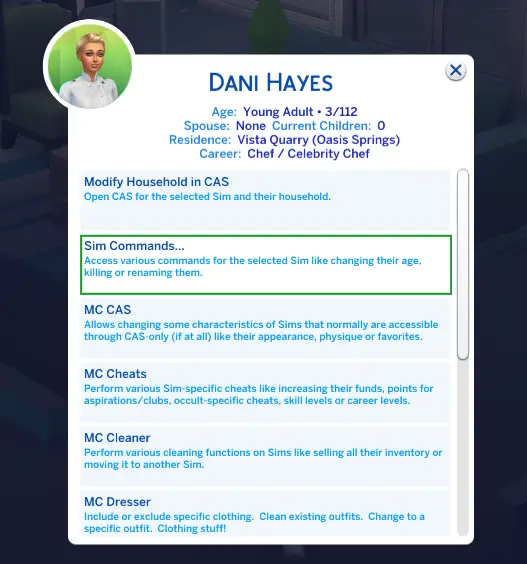
In cases like that, I may ask you to generate a detailed Sim log through MC Command Center.
To do that:
Click on the Sim >> go to MCCC >> Sim Commands >> Logging Commands >> Log Sim Details >> Select all options >> Create detailed log.
This can be really helpful when the issue seems isolated to one Sim rather than the mod more generally.
Test before you report and say what you tried
Before reporting a problem, it is worth doing a few quick checks. Make sure you are using the latest version of the mod. Check whether the creator has already posted a patch update or known issue note. Delete localthumbcache. Test whether the issue still happens. Make sure any required files are installed. Think about whether another mod could be involved.
Sometimes the answer is already on the download page or update post. Even when it is not, doing those checks first makes your report much stronger.
When you do report the issue, say what you have already tried. If you deleted localthumbcache, tested in a new save, removed other mods, used the 50/50 method, updated to the latest version, or confirmed the issue still happens with only that mod installed, include that in your report. It helps the modder avoid repeating the same troubleshooting steps and shows that you have already done some work to narrow things down.
Keep the report focused and factual
If possible, keep your report focused on one clear issue at a time. When one message includes a long list of different problems, it becomes much harder to work out what is actually going on. It is usually better to explain the clearest issue first. That gives the modder a much better starting point.
It is also completely normal to feel frustrated when something goes wrong, especially if the save matters to you. But reports are much easier to work with when they stay factual and specific. Messages like “everything is broken” or “this mod ruined my game” may show how you feel, but they do not explain what happened. A calm and specific report is much more likely to get a useful response.
Example of a useful bug report
Example of a poor bug report
A useful report might look like this:
“Hi, I am using version 3.7 of the mod. After updating my game yesterday, the routine appointment interaction no longer appears for pregnant Sims. The buff still shows correctly, but when I click on the Sim there is no appointment option. I tested in a new save with only this mod installed and the issue still happens. I also deleted localthumbcache. I have attached a screenshot and the Last Exception file.”
This works well because it names the mod version, explains the exact issue, says when it started, explains what was tested, and includes supporting files.
A poor report would look like this:
“Your mod is broken. It does not work. Please fix.”
The reason this is unhelpful is simple: it does not explain what is broken, which version is being used, whether the game was recently patched, whether any testing was done, or whether there is an error file. There is nothing there to investigate.
Why a good bug report matters
If you are not sure how to structure your report or what information to include, this is an easy format to follow:
- Mod name:
- Mod version:
- Game version:
- What is happening:
- What I expected to happen:
- When the issue started:
- How to reproduce it:
- Does it happen every time:
- Other mods that may be relevant:
- What I have already tested:
- Error files or screenshots attached:
Even filling that out briefly can make your report much more useful.
A good bug report is not about being perfect. It is about giving enough clear information for a modder to understand the issue and test it properly. The more specific and organised your report is, the easier it is for a creator to help you. That means less confusion, fewer follow up questions, and a much better chance of getting the problem solved.